



Get a personalized assessment of your operational efficiency and accelerate growth for your business.
If you scroll through LinkedIn or X, it feels like software development is already a solved problem.
Founders say they "vibe coded" a multi-million dollar platform in a weekend. And then there are AI coding agents that promise to wipe out coding backlogs overnight. Some venture pitches tend to just slap an "AI" label on a basic wrapper built on someone else's API.
Talk to real engineering teams and investors, and you get a different picture: AI in product development hype vs. reality. Two very different stories you get, depending on who you ask and what stage of the build you're looking at.
When you rise above the social media hype, a clear pattern is seen: AI is dramatically reducing the cost of ideation, prototyping, coding, and routine task automation. But it is simultaneously increasing the technical debt, breaking down at integration points, and creating a false sense of production readiness.
Here is the candid breakdown of where AI earns the hype, and where experienced builders warn it will cost you.
1. Where AI Works: Throwaway Prototypes & Idea Synthesis
The fastest way to burn capital in software development has always been building features nobody wants.
AI has fundamentally changed the economics of early validation.
In our recent podcast, our Chief Product Officer Zach Bruno explained how modern product teams use AI tools, aka “vibe coding tools” (such as Lovable, Cursor, Replit, etc) during the discovery phase:
"The goal of discovery is to bring the idea to life very quickly and start getting feedback... What we're seeing now is during discovery, it's becoming easier and easier to build a real functioning prototype via AI tools. Even if it's not great, it's a tangible way to walk through something with users before you spend all this time and money building the real thing." — Zach Bruno, Chief Product Officer at Imaginovation
This is the part of the hype that's true.
A founder can go from idea to something users can click through in days (or even a few hours) instead of quarters. Feedback comes back fast, and bad ideas get killed early.
Where AI Fails: Confusing a Working Prototype with a Scalable Product
I call it the readiness paradox. In enterprise sectors, billions of dollars (and time) are lost every year on software that doesn't meet the mark. And technology isn’t the villain here, tbh.
The real problem shows up earlier, when AI compresses discovery from months to days. Research that once took a quarter now comes back in hours. Speed like that is easy to mistake for readiness.
Teams rush into development because discovery felt thorough. AI moved fast and produced a working prototype. Fast feels like proof. The team skips error handling, security, integration audits, and the edge cases actual users find later on.
That's where AI code technical debt starts: the moment a team treats a fast discovery phase as a finished one.
What looks done and what can actually stay durable are two different questions, and AI mostly caters to the first.
The breakdown happens when non-technical founders mistake the demo for the real thing.
I recently talked with Jim Ferry, Partner at Boston-based growth equity firm Volition Capital ($675M Fund V), who cautioned founders on this exact trap:
"Gone are the days where it's like, 'Hey, we need a million dollars to go build this product.' One person can go build a prototype now... But it's not there yet where you can just take that prototype and launch it commercially. There's a decent amount of technical debt that needs to be cleaned up to become a business that can scale from a hosting, back-office, security, and compliance perspective." — Jim Ferry.
The Takeaway for Builders:
Use AI to scaffold throwaway prototypes and validate user interest for the next few weeks. But remember that this AI-generated prototype is meant to be tested and discarded, and not deployed to enterprise customers.
2. Where AI Works: Localized Code Generation & Developer Speed
Developer velocity is at its peak with AI coding assistants like Claude Code, Cursor, OpenAI Codex, and GitHub Copilot.
The repetitive scaffolding tasks that used to eat hours of a developer's day can now get generated in minutes.
What makes AI in software development really strong is its ability to handle narrow, well-defined tasks, where developers spend less time typing and more time on problems that need a human touch.
For example, I personally built an AI-readiness platform in a week, which would have taken at least a couple of weeks to design and code. By the way, it’s a simple yet fully functional platform — nothing crazy — but we still saved a lot of time building it.
Where It Fails: Quality Verification, System Integrations & Edge Cases
Writing code faster has exposed a massive downstream bottleneck: QA.
Generating a piece of software takes 10 minutes. Debugging it, finding bugs, and figuring out why it isn't working as it was supposed to can take three days.
Just because AI can generate code at an ultrafast speed doesn’t mean the code is top-notch and fully functional.
Technical debt compounds quietly here too. If a repository already has bad patterns in it, AI doesn't correct them; it repeats them, again and again, across every new file it touches.
Gal Vered, CEO of Checksum AI and former Google Product Manager, pointed out that the speed of generation has dramatically outpaced the speed of verification:
"I can open Cursor right now, prompt it, and get a piece of software in 10 minutes. In theory, I get exactly what I asked for. But in reality, there's a very high chance it won't work, and even if it works locally on my machine, there's a high chance it breaks when I deploy to production.
Once AI writes the code, you lose the level of thinking in the tiny details and edge cases. You can't rely on the AI agent to do it. If you have bad patterns in your repository, the AI is going to repeat them again and again. It compounds the technical debt." — Gal Vered
It's a catch: when developers use AI to generate large pull requests without continuous, automated testing pipelines, they don't eliminate engineering time. They just shift it from building features to endless bug-fixing triage.
The Takeaway for Builders:
Use AI’s assistance to handle the boilerplate, but don’t allow it to skip the review. Every AI-generated pull request must go through the same testing rigor as human-written code, if not more, since AI will happily repeat a bad pattern a hundred times before anyone notices.
3. Where AI Works: Internal Operational Efficiency
There's a stark contrast between where companies think AI will pay off and where it actually delivers ROI. Most default to product or customer, or marketing use cases.
But the real gains are internal, not outward-facing.
AI can improve operational efficiency by automating routine workflows and handling data routing.
You can use AI for automated data pipelines and reporting purposes. For example, at Imaginovation, we’ve built an internal analytics platform for our flagship product MagicTask. This analytics platform pulls data from the main database to generate reports and dashboards on user journeys.
Where It Fails: Slapping "AI Features" on Products Without Real Customer Value
The trap is in considering AI as a checklist of features rather than a real solution to a real problem. A chatbot that doesn't answer questions, or a recommendation feature nobody asked for — such scenarios don't build trust; they erode it.
Meanwhile, the need to automate internal operations remains underused, even though it's where AI's reliability matters most: internal tools don't need to be perfect for every user, just better than the manual process they replace.
"Where people get lost is on the product side. They think just because they throw 'AI' as a buzzword into their product, that means it's good. If you're not delivering real customer value and solving an actual problem, it's just a buzzword." — Zach Bruno, Chief Product Officer at Imaginovation.
Jim Ferry echoed this from an investment portfolio perspective as well, noting that companies are using AI to streamline internal vendor costs rather than hiring ballooning headcount:
"We had a portfolio company eliminate almost a million dollars of annual software spend just by looking at their software vendors and deciding, 'Hey, there are a few internal workflow tools here that we can just build in-house.' It allowed them to hold the R & D headcount relatively flat while driving significantly higher output." — Jim Ferry, Partner at Volition Capital
The Takeaway for Builders:
Before adding an AI feature to your product, ask who it's actually for. If the honest answer is "investors" or "the press release," redirect that effort inward. The ROI on eliminating a repetitive internal workflow is measurable in dollars and hours almost immediately; the ROI on a customer-facing AI gimmick is measured in how quickly users learn to ignore it.
4. Where AI Works: Developer Leverage & Engineering Acceleration
One of the most persistent myths of the current tech cycle is that AI will replace the need for software engineers entirely—that a non-technical founder can prompt a complex platform into existence without an engineering team.
The reality across all our conversations is the exact opposite: AI doesn't eliminate the need for experienced engineers; it exponentially widens the gap between junior builders and senior architects.
When an engineer understands data structures, concurrency, security boundaries, and scalability, AI acts as an incredible force multiplier. But when an inexperienced builder attempts to "vibe-code" enterprise software, they hit a wall the moment the system faces real-world traffic, multi-tenant isolation, or complex API integrations.
In our podcast, Zach Bruno framed the dynamic:
"If you're not an engineer, AI and vibe coding will make you more powerful. But if you are an engineer, you're going to be unstoppable. Because experienced engineers are still thinking in terms of holistic architecture, security, and edge-case handling. When an inexperienced founder thinks they can vibe-code a scalable company from scratch without understanding how systems work, they hit a wall very quickly." — Zach Bruno, Chief Product Officer at Imaginovation
Where It Fails: Replacing Deep Architectural Judgment & System Design
The trap is assuming that because AI can produce syntactically valid code in seconds, it has also designed a sound system.
Architecture decisions, compliance postures (HIPAA, SOC2, GDPR), and the edge cases that only show up once real users start working on a system don't reveal themselves in a generated script.
They reveal themselves in production under load—usually at the worst possible time—and by then the cost of not having an experienced engineer in the loop from the start has already been paid.
Even the companies building frontier AI systems aren't betting on AI replacing that engineering judgment. Gal Vered reinforced this when discussing how top tech companies operate:
"Anthropic just rebuilt a C compiler in a day, which is incredible. But Anthropic also has over 100 open software engineering positions right now. You still need human engineers thinking through the hard problems." — Gal Vered, Co-Founder & CEO at Checksum AI
The Takeaway for Builders:
Use AI to eliminate repetitive coding and multiply developer output. But never confuse code generation with system architecture. The founders who win won't be those trying to replace engineers with AI prompts—they will be the ones pairing senior technical judgment with AI velocity.
5. The Decision Framework
The 2026 AI Product Development Decision Matrix
| Software Development Phase | Safest AI Application | Risk / Failure Mode if Solely AI-Driven | Mandatory Human Engineering Role |
|---|---|---|---|
| 1. Product Discovery & Validation | Rapid throwaway interactive prototypes (Lovable, v0, Cursor); synthesizing user interview notes; drafting initial PRDs. | Mistaking a prototype for scalable production code; overbuilding features before validating willingness to pay. | Defining core value proposition, interviewing users, auditing feasibility, structuring data models. |
| 2. Architecture & Data Design | Generating boilerplate schema syntax; exploring architectural pattern pros/cons. | Incoherent data flow; inability to scale; security/compliance loopholes (HIPAA, SOC2, GDPR). | 100% Senior Architect-Led. Decoupled microservices/monolith decision, multi-tenant security, concurrency modeling. |
| 3. Code Implementation & Feature Dev | Drafting localized CRUD functions; generating unit tests; refactoring small isolated modules. | Compounding technical debt; hallucinated libraries; repeating bad patterns across the repository. | Reviewing PRs; maintaining code standards; orchestrating multi-system logic. |
| 4. QA & Quality Verification | Continuous automated test generation (e.g., Checksum AI); regression test synthesis. | False sense of security; AI PR review tools catching some bugs while missing silent architectural edge cases. | Defining critical business logic assertions, security penetration testing, final deployment sign-off. |
| 5. Operations & Internal Workflows | Workflow orchestration (n8n, Lindy); replacing bloated 3rd-party SaaS with custom internal micro-agents. | Overcomplicating internal tooling without clear maintenance ownership. | Setting data access controls, monitoring API rate limits and token expenditures. |
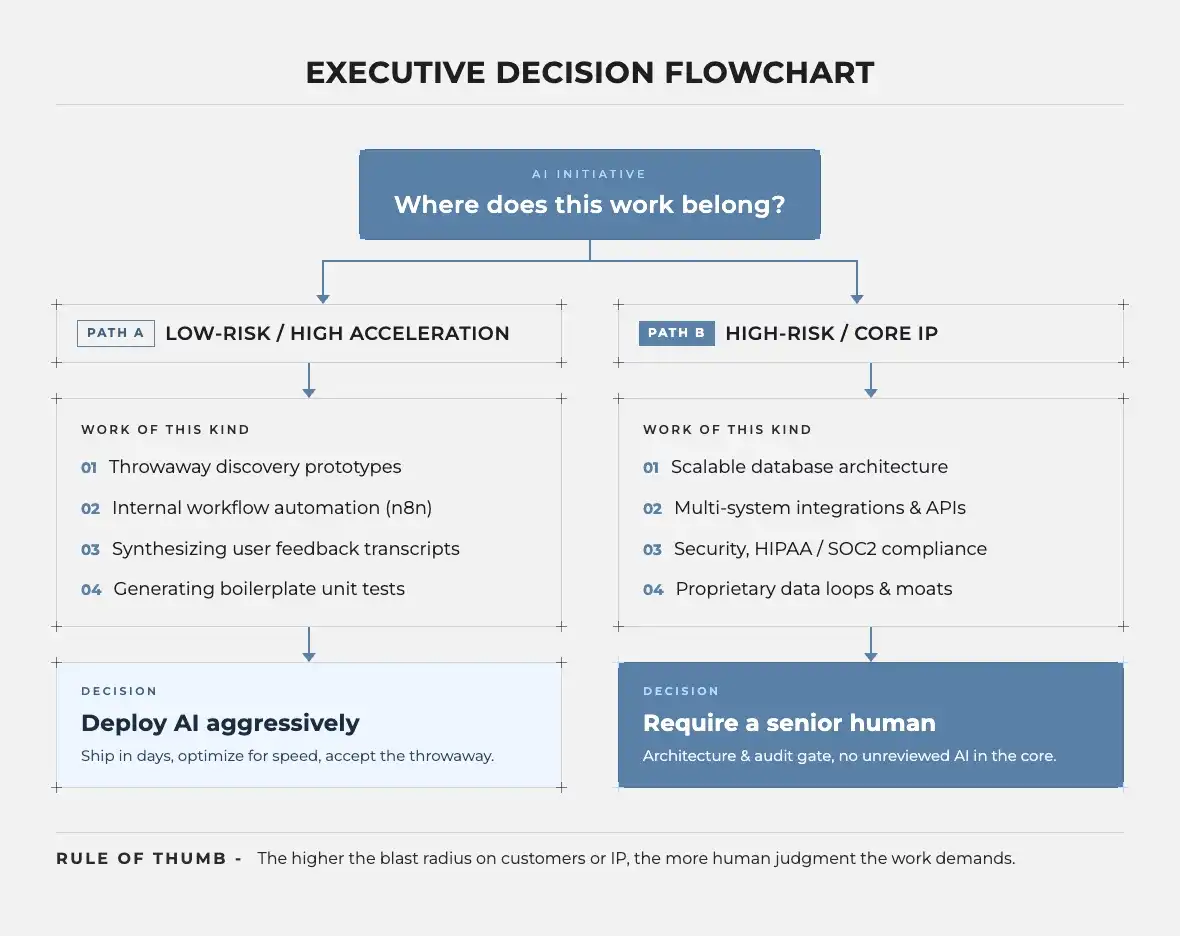
The Verdict: How Leaders Should Approach AI in 2026
There is a pattern held within the four contrasts: AI is extraordinarily good at cutting down time, and bad at replacing judgment. The key is to understand where to apply AI and where to hold back.
- Use AI aggressively during Discovery
AI is quite useful and has the least risk in the earliest stages of building something new.
With just a prompt, tools can convert a rough idea into a working prototype in days, so teams can easily run a check if people need it before spending on it to build it for real. This makes it easy to quickly weed out bad ideas. At this stage, speed is a clear win with almost no downside.
- Never deploy unverified AI code to production
Fast generation isn't the same as production-ready. If developers use AI to speed up pull requests, that speed only pays off with equally serious investment in automated testing.
Skip it, and you're not saving time; you're deferring it, while technical debt compounds every time AI repeats an uncaught bad pattern.
- Focus on durability over features
Code is no longer a defensible advantage. As Jim Ferry has pointed out, once anyone can generate functional software quickly, code stops being your edge.
What holds up instead: proprietary data, deep integrations into mission-critical workflows, and unglamorous domain problems customers can't easily walk away from. It is vital to work around building that kind of stickiness, and not for a longer feature list.
- Prioritize internal automation first
Before considering adding AI to anything that is customer-facing, try to look inward. Automating back-office tasks, data routing, and reporting delivers savings fast.
The added advantage is that there is no brand risk of shipping a half-baked AI feature to real users. It's the lowest-risk, highest-ROI place to start, and for most companies, still the most underused.
The bottom line:
By 2026, just saying "we use AI" isn't a strategy anymore. Used to speed up discovery, automate repetitive tasks, and draft early versions of things, AI can unlock real value. But used as a stand-in for checking your work, for engineering judgment, or for a real answer to "why should we switch to you?", it's just a risk hiding behind a buzzword.
Ready to Turn Your Prototype into a Scalable Product?
At Imaginovation, we help founders and product leaders bridge the gap between rapid AI prototyping and secure, production-grade custom software.
Contact our team today to discuss your project and scale your build with confidence.