



Get a personalized assessment of your operational efficiency and accelerate growth for your business.
If you're reading this, you probably already know you need a website (or a better one).
What you don't know is what it should cost. And honestly, the internet isn't much help. You'll find answers ranging from "$500" to "half a million," and most of them are right, depending on what you're building.
Almost all businesses already have a website. But a huge number of them overpaid, underbuilt, or both, because they didn't understand what they were buying before they bought it.
That's what this guide is for. We'll walk you through what actually drives website development costs in 2026, what different types of websites realistically cost, and how to avoid the mistakes that waste the most money.
Baseline: What Does a Website Cost in 2026?
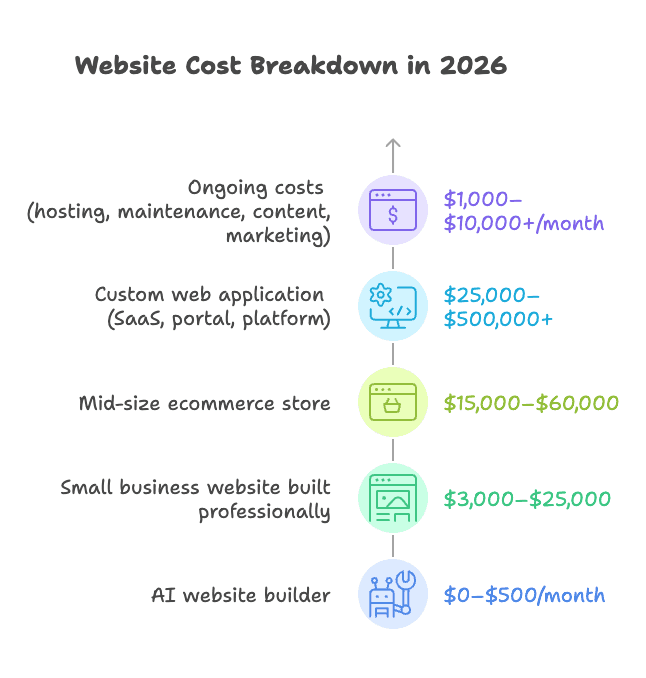
Here are the general ranges to orient yourself before we get into the details:
- An AI website builder (Wix AI, Framer, Squarespace AI) costs $0–$500/month and can get you online in a day
- A small business website built professionally typically costs $3,000–$25,000
- A mid-size ecommerce store runs $15,000–$60,000, depending on catalog size and integrations
- A custom web application (SaaS, portal, platform) starts at $25,000 and can easily reach $500,000+
- Ongoing costs (hosting, maintenance, content, and marketing) run $1,000–$10,000+ per month for most established businesses
These ranges are wide because the variables are wide. The sections below explain what drives those numbers.
What Determines Website Development Cost?
Six things drive most of the variation you see in website pricing.
1. Scope and Features
A clean five-page site with a contact form takes a week at most with today's tools. Add a user login system, a pricing calculator, a booking flow, or a product database and you're looking at weeks of additional engineering. Every interactive feature has to be built, tested, and integrated.
Features that commonly push budgets higher:
- User authentication and role-based access
- Search and filtering with dynamic results
- Booking, scheduling, or reservation systems
- Payment processing and checkout flows
- Third-party data syncs (CRM, ERP, inventory)
Page count matters less than people think. What matters more is how many unique page templates your site needs. Five pages sharing two layouts is a very different project from fifteen pages each needing a custom structure.
2. Design: Template vs. Custom
For most small to mid-size businesses, starting from a well-chosen template and customizing it to your brand is the right call. You get to market faster, spend less, and often end up with a cleaner result than an over-engineered custom build.
Fully custom design (original layouts, custom illustrations, motion design, bespoke components) adds $5,000 to $20,000 or more to the design phase alone.
| Approach | Cost | Best For |
|---|---|---|
| Template + customization | $500–$5,000 | Most small/mid-size businesses |
| Semi-custom (custom on a framework) | $5,000–$15,000 | Brands needing differentiation |
| Fully custom design | $15,000–$30,000+ | Enterprise, design-led brands |
3. Technology Stack
Your platform choice affects both what you pay to build and what you pay to run. Think this through carefully before any development starts.
- WordPress: Cheap to launch, but needs consistent maintenance and security attention. Huge plugin ecosystem.
- Webflow: Cleaner editing experience, higher visual ceiling. Slightly higher starting cost.
- Shopify / Squarespace: Trade flexibility for predictability. Great for some businesses, limiting for others.
- Headless / Custom: Expensive to build, but maximum flexibility at scale. Best for complex or high-traffic products.
The wrong choice early is expensive to undo later. This decision deserves more thought than it usually gets.
4. Third-Party Integrations
This is where projects most often blow past their original budget. Each integration adds complexity, and the costs stack up fast:
- CRM connection (Salesforce, HubSpot): $2,000–$8,000
- Payment gateway (Stripe, PayPal): $1,000–$5,000
- ERP or inventory sync: $3,000–$10,000
- Marketing automation (Mailchimp, Klaviyo): $1,000–$3,000
- Custom API integrations: $2,000–$10,000+ each
The more systems that need to talk to each other, the more expensive the project becomes. Get a complete list of required integrations into your brief before you go out for quotes. Surprises here are costly.
5. Development Phases and What Each Costs
Understanding how a website is actually built helps explain where the money goes. Most professional builds go through four core phases.
UI/UX Design:
This is where your website takes shape visually: research, wireframing, and interface design. Good UX design isn't cosmetic; it's structural.
A poorly designed flow costs you conversions regardless of how well the code behind it is written. Typically takes 1 to 2 weeks.
Cost: $5,000 to $15,000, depending on complexity.
Front-End Development:
The front-end is everything a visitor sees and interacts with. Design gets translated into a working interface here.
The biggest cost drivers are responsiveness across devices and the complexity of animations or interactive elements.
Typically takes 2 to 5 weeks.
Cost: $10,000 to $20,000 for a professional build.
Back-End Development:
The back-end handles data processing, server logic, integrations, and security. It's the core of any site that does more than display static content. Third-party integrations and complex data operations are the biggest cost drivers.
Typically takes 3 to 8 weeks.
Cost: $12,000 to $25,000, depending on scope.
CMS Development:
A content management system lets your team update pages, publish content, and make minor edits without touching code. Whether you use WordPress or a custom-built CMS, setup and configuration still takes real effort.
Typically takes 2 to 5 weeks.
Cost: $3,000 to $10,000.
| Phase | Timeline | Typical Cost |
|---|---|---|
| UI/UX Design | 1–2 weeks | $5,000–$15,000 |
| Front-End Development | 2–5 weeks | $10,000–$20,000 |
| Back-End Development | 3–8 weeks | $12,000–$25,000 |
| CMS Development | 2–5 weeks | $3,000–$10,000 |
These phases often overlap, and not every project requires all four. A simple brochure site may skip back-end development entirely. A custom application may spend far more on back-end than on anything else.
Website Types and Their Costs
The type of website you're building is the single biggest variable in your budget.
Before you get a single quote, you need to know which category you're actually in. The right answer for one business is a waste of money for another.
1. Brochure and Landing Page Sites
These are simple, focused websites, typically 3 to 7 pages, designed to introduce a business, communicate its value, and drive a specific action (a call, a form fill, a store visit).
They're the most common starting point for small businesses and service providers. The goal is clarity, not complexity.
A well-executed brochure site with clean design, strong copy, and a clear call to action can outperform an over-built site every time.
- Cost: $2,000–$10,000 professionally built
- Timeline: 2–4 weeks
- Best for: Local businesses, consultants, service providers, any business that needs a credible online presence without a large feature set
2. Corporate Websites
Corporate sites serve a different purpose. They communicate brand values, support business development, host investor relations, showcase case studies, and often connect multiple departments and audiences.
They're more content-heavy and require tighter coordination between design, content, and development.
- Cost: $15,000–$75,000 depending on size and complexity
- Timeline: 6–16 weeks
- Best for: Mid-size to enterprise companies, professional services firms, businesses where the website supports multiple audiences (customers, partners, press, investors)
3. E-Commerce Websites
E-commerce costs more than people expect, and the gap between a small store and a mid-size one is significant.
The catalog size matters, but what really drives cost is complexity: how many payment methods you need, whether inventory syncs to an external system, whether pricing rules vary by customer type, and how much of the purchasing flow needs to be customized.
Platform choice is a major decision here.
Shopify is fast to launch and handles a lot out of the box, but transaction fees and app subscriptions add up over time.
WooCommerce gives you more control but requires more technical investment.
A fully custom commerce build makes sense at enterprise scale when neither option fits your requirements.
- Small store (under 100 products): $5,000–$20,000
- Mid-size store: $20,000–$60,000
- Large-scale or custom commerce platform: $60,000–$250,000+
- Worth knowing: E-commerce functionality adds 40–60% to base development cost. Payment integration alone runs $1,000–$5,000, and that's before any inventory or ERP connections.
4. Web Portals and Directories
These are information-heavy platforms where users search, filter, and browse listings: real estate, job boards, hotel directories, and car rentals.
The complexity comes from location-based search, rating systems, and the infrastructure needed to manage large volumes of user-generated content.
- Cost: $20,000–$150,000+ depending on features and scale
- Timeline: 3–9 months
- Best for: Marketplace businesses, aggregators, platforms built around searchable databases
5. Custom Web Applications
If you're building a SaaS product, an internal operations tool, a customer portal, or anything that needs custom data flows, user roles, and business logic specific to your company, you're in custom web application territory.
These are scoped and engineered from the ground up, not adapted from a template.
The price range is wide because the complexity genuinely varies. A straightforward customer dashboard is a very different project from a multi-tenant platform with complex permissions and third-party integrations.
Before committing to a full custom build, it's worth working through the cost-benefit analysis.
Sometimes a well-configured platform gets you 90% of the way there at a fraction of the cost. Sometimes it doesn't, and custom is the only real option.
- Mid-complexity application: $25,000–$100,000
- Enterprise-grade platform: $100,000–$500,000+
- Timeline: 3–12 months, depending on scope
Website Development Costs by Vendors
Beyond the type of site, who you hire shapes the budget, timeline, and working experience as much as anything else.
| Option | Typical Cost | Best For | Watch Out For |
|---|---|---|---|
| AI Builder | $0–$500/mo | Simple web presence, fast launch | Limited flexibility, generic look |
| Freelancer | $50–$150/hr | Defined scope, cost-conscious projects | Capacity limits, single point of failure |
| Boutique Agency | $75–$200/hr | Growth-stage companies, full-service delivery | Higher cost, slower ramp-up |
| Enterprise Agency | $150–$300/hr | Complex platforms, regulated industries | Significant investment, longer timelines |
| Offshore Team | $25–$60/hr | Budget-sensitive projects with clear specs | Communication overhead, quality variance |
What the table doesn't show is what's included. Agencies typically wrap in project management, QA, structured feedback rounds, and proper handoff documentation.
Freelancers usually don't, which means those responsibilities fall to you. A freelancer at $75/hr who takes twice as long is not necessarily the cheaper option.
Average 2026 developer hourly rates (via Arc.dev's developer rate index):
- Junior: $25–$50/hr
- Mid-level: $50–$100/hr
- Senior: $100–$200/hr
- US/UK specialist: $150–$250/hr
According to Clutch's 2026 pricing data, the average agency project runs approximately $66,500 with a timeline of around 9 months, though this spans a wide range depending on scope and agency tier.
If you're weighing whether to build in-house, outsource to an agency, or explore AI-assisted development models, this breakdown of the trade-offs is worth reading before you decide.
How AI Is Reshaping Website Development Costs in 2026
AI is changing what development costs, how long it takes, and what's possible at different budget levels.
Here's what's actually happening and what it means if you're buying a website or application today.
1. Developers Are Working Faster
Tools like GitHub Copilot and Cursor are now standard in most professional development workflows. They handle repetitive coding tasks, suggest completions, and flag errors in real time.
GitHub's own research puts the numbers in context: developers complete tasks up to 55% faster with AI assistance. Pull request cycle times have dropped from 9.6 days to 2.4 days. GitHub Copilot now generates 46% of the code written by its users and has been adopted by 90% of Fortune 100 companies.
2. What That Means If You're Buying
Sophisticated agencies are delivering faster than they were two years ago. The better ones pass some of that efficiency through, either in more competitive pricing or more scope at the same budget.
A simple question worth asking any agency you're evaluating: how does AI fit into your development workflow? The answer tells you whether you're working with a team that's keeping pace or one that's still billing the same hours for work that now takes half the time.
3. Low-Code and No-Code Are Legitimate Now
This isn't just a trend anymore.
Gartner forecasts that by 2026, 75% of all new applications will include low-code components, with the market exceeding $30 billion.
Platforms like Webflow, Bubble, and Retool can cut development time by 50–70% for the right use cases.
Builds that once required a fully custom codebase can now be delivered faster and cheaper on these platforms without meaningful compromise. Not for every project, but for more projects than most people assume.
4. What AI Still Can't Do
Be clear-eyed about the limits, though. AI tools don't replace the thinking behind good software: architecture decisions, UX strategy, complex integration work, performance engineering, and the judgment that comes from building and shipping real products over time.
AI makes skilled developers more productive. It doesn't make unskilled ones skilled. When a project is genuinely complex, the quality of the team still matters more than their tooling.
5. Building for Web and Mobile? Consider PWAs First
If your project involves both a website and a mobile presence, Progressive Web Apps (PWAs) are worth evaluating before you commit to building two separate products.
A single PWA codebase works across web and mobile and typically costs 40–60% less than building parallel products. For most use cases, the performance difference is negligible.
The Full Website Cost: Don't Budget for Build Alone
The upfront build is only part of what you'll spend. Many businesses are caught off guard by the costs that kick in after launch. Here's what to plan for before you sign anything.
Hosting and Infrastructure
Where your site lives affects both performance and price. Shared hosting runs $5–$30/month and is adequate for simple sites.
VPS or managed hosting sits between $50–$500/month and is the right range for most professional builds. Cloud infrastructure on AWS, GCP, or Azure scales with traffic and can run $100–$2,000+/month for business-grade setups.
Underestimating this is common, especially as traffic grows.
Domain and SSL
Domain registration typically costs $10–$20/year for standard extensions. Custom or premium extensions (.store, .app, .io) can run $50–$300/year.
SSL certificates are often bundled with hosting at no extra cost, though premium certificates run $50–$200/year.
Maintenance and Updates
A site that isn't maintained degrades quickly. CMS updates, plugin patches, security monitoring, and uptime checks all require ongoing attention.
Most businesses operate on one of two models: a basic maintenance retainer ($500–$1,500/month) that covers updates and monitoring, or an active development retainer ($2,000–$10,000/month) for teams that want continuous feature development.
A reasonable rule of thumb: budget 20–30% of your initial build cost annually for maintenance and improvements.
Third-Party Tools and Integrations
CRM, marketing automation, analytics, chat tools, and booking systems each carries its own licensing fee.
For a typical mid-size business stack, budget $100–$1,000/month in tool costs on top of development. These fees are recurring and often grow as your team or usage scales.
Common Mistakes That Blow Website Budgets
1. Choosing on Price Alone
The cheapest quote is usually the most expensive outcome. Scope gaps, poor quality, and full rebuilds cost far more than a slightly higher upfront investment in the right team.
The question isn't who's cheapest. It's who delivers the best value at a price that makes sense for your project.
2. Underspecifying at the Start
Vague briefs lead to change orders. The more clearly you define features, integrations, and success criteria before work begins, the more accurate your quote and the less you'll spend on surprises mid-project. Spend time on the brief. It pays for itself.
3. Not Accounting for Content
Development is only part of the scope. Professional copywriting, photography, content strategy, and migration from your old site are real line items. Forgetting them at the budgeting stage typically adds $3,000–$15,000 to the final bill.
4. Treating It as a One-Time Purchase
A website is an ongoing investment, not a capital expense. Security, updates, performance tuning, and content changes don't stop at launch. If your budget only covers the build, you'll be back asking for more money within months.
How to Get the Best Outcome for Your Budget
1. Write a Proper Brief Before You Talk to Anyone
Document your goals, your audience, the features you need, and the integrations you rely on before you approach a single vendor. You'll get sharper quotes, fewer mid-project surprises, and a much easier time comparing proposals.
2. Prioritize Ruthlessly
Launch with what matters. A focused, well-executed Phase 1 is almost always better than an overscoped project that drags on for months. Phase 2 exists for a reason. Use it.
3. Ask Every Vendor the Same Questions
How do you handle scope changes? What does ongoing support look like after launch? How does AI fit into your development workflow? The answers reveal a lot about how working with them will actually feel.
4. Get Itemized Proposals
A serious vendor will break down design, development, content, testing, and launch as separate line items. If everything is bundled into one number, you can't make trade-offs. Push for the breakdown.
5. Think in Total Cost of Ownership
A $5,000 site that needs $500/month in maintenance and underperforms in search can cost more over three years than a $20,000 site built properly from the start.
Factor in hosting, tools, maintenance, and content before comparing options.
Quick Reference: 2026 Cost Summary
| Website Type | Build Cost | Timeline |
|---|---|---|
| AI Builder (DIY) | $0–$6,000/year | Hours to days |
| Brochure / Landing Page | $2,000–$10,000 | 2–4 weeks |
| Small Business Site (Pro) | $5,000–$25,000 | 4–10 weeks |
| Corporate Website | $15,000–$75,000 | 6–16 weeks |
| E-Commerce (Small-Mid) | $5,000–$60,000 | 6–16 weeks |
| Web Portal / Directory | $20,000–$150,000+ | 3–9 months |
| Custom Web Application | $25,000–$500,000+ | 3–12 months |
| Enterprise Platform | $100,000–$1M+ | 6–18 months |
Build Your Website with Imaginovation
If you've read this far, you have a solid picture of what your project should cost and what to watch out for. The next step is finding the right team to build it.
At Imaginovation, we've helped businesses from startups to Fortune 500 companies build websites and web applications that actually perform. We're straightforward about what things cost and why, and we work to make sure you're never surprised mid-project.