




Get a personalized assessment of your operational efficiency and accelerate growth for your business.
If you're reading this, you probably already know you need a website (or a better one).
What you don't know is what it should cost. And honestly, the internet isn't much help. You'll find answers ranging from "$500" to "half a million," and most of them are right, depending on what you're building.
Almost all businesses already have a website. But a huge number of them overpaid, underbuilt, or both, because they didn't understand what they were buying before they bought it.
That's what this guide is for. We'll walk you through what actually drives website development costs in 2026, what different types of websites realistically cost, and how to avoid the mistakes that waste the most money.
Baseline: What Does a Website Cost in 2026?
Here are the general ranges to orient yourself before we get into the details:
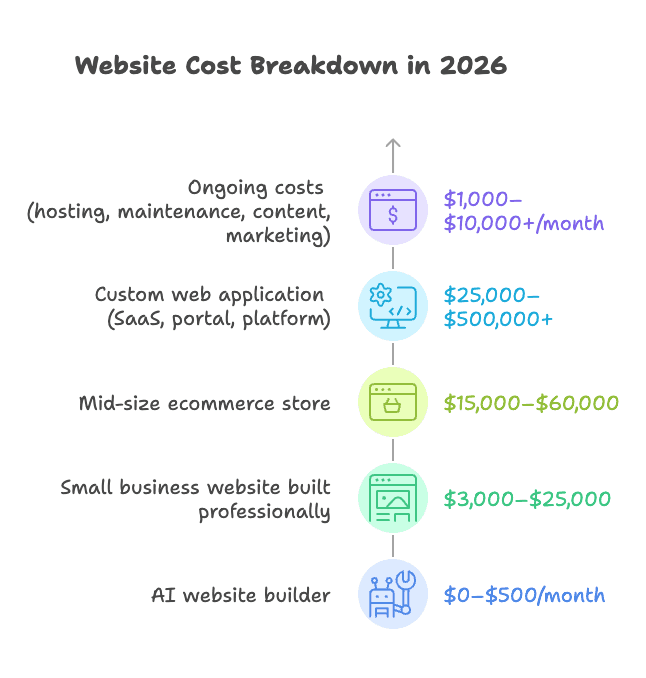
- An AI website builder (Wix AI, Framer, Squarespace AI) costs $0–$500/month and can get you online in a day
- A small business website built professionally typically costs $5,000–$25,000
- A mid-size ecommerce store runs $15,000–$60,000, depending on catalog size and integrations
- A custom web application (SaaS, portal, platform) starts at $25,000 and can easily reach $500,000+
- Ongoing costs (hosting, maintenance, content, and marketing) run $1,000–$10,000+ per month for most established businesses
If you already have a site and are weighing a rebuild against improving what you have, the numbers work differently — our piece on enterprise website redesign ROI covers that comparison.
Below $5,000, you are buying a template build: a well-chosen theme, your brand applied to it, light customization and a short timeline. That is a legitimate purchase and the right one for plenty of businesses — it is simply a different product from a designed, custom-built site, which is where the $5,000 floor comes from. The brochure-site range further down starts at $2,000 for exactly this reason.
What these ranges assume, and what they leave out. Every figure in this guide is for a US or Canadian buyer working with a professional freelancer or agency, quoted in US dollars. Geography moves these numbers more than any other single factor — the vendor rate table below shows offshore rates starting at a fraction of US agency rates for the same nominal scope. They cover design, development, QA and launch of the site itself. They do not include copywriting and photography, content migration, paid media, third-party software licences, or hosting and maintenance after launch. Those are real, and they are itemized later in this guide.
These ranges are wide because the variables are wide. The sections below explain what drives those numbers.
What Determines Website Development Cost?
Six things drive most of the variation you see in website pricing.
1. Scope and Features
A clean five-page site with a contact form takes a week at most with today's tools. Add a user login system, a pricing calculator, a booking flow, or a product database and you're looking at weeks of additional engineering. Every interactive feature has to be built, tested, and integrated.
Features that commonly push budgets higher:
- User authentication and role-based access
- Search and filtering with dynamic results
- Booking, scheduling, or reservation systems
- Payment processing and checkout flows
- Third-party data syncs (CRM, ERP, inventory)
Page count matters less than people think. What matters more is how many unique page templates your site needs. Five pages sharing two layouts is a very different project from fifteen pages each needing a custom structure.
2. Design: Template vs. Custom
For most small to mid-size businesses, starting from a well-chosen template and customizing it to your brand is the right call. You get to market faster, spend less, and often end up with a cleaner result than an over-engineered custom build.
Fully custom design (original layouts, custom illustrations, motion design, bespoke components) adds $5,000 to $20,000 or more to the design phase alone.
| Approach | Cost | Best For |
|---|---|---|
| Template + customization | $500–$5,000 | Most small/mid-size businesses |
| Semi-custom (custom on a framework) | $5,000–$15,000 | Brands needing differentiation |
| Fully custom design | $15,000–$30,000+ | Enterprise, design-led brands |
3. Technology Stack
Your platform choice affects both what you pay to build and what you pay to run. Think this through carefully before any development starts.
- WordPress: Cheap to launch, but needs consistent maintenance and security attention. Huge plugin ecosystem.
- Webflow: Cleaner editing experience, higher visual ceiling. Slightly higher starting cost.
- Shopify / Squarespace: Trade flexibility for predictability. Great for some businesses, limiting for others.
- Headless / Custom: Expensive to build, but maximum flexibility at scale. Best for complex or high-traffic products.
The wrong choice early is expensive to undo later. This decision deserves more thought than it usually gets.
4. Third-Party Integrations
This is where projects most often blow past their original budget. Each integration adds complexity, and the costs stack up fast:
- CRM connection (Salesforce, HubSpot): $2,000–$8,000
- Payment gateway (Stripe, PayPal): $1,000–$5,000
- ERP or inventory sync: $3,000–$10,000
- Marketing automation (Mailchimp, Klaviyo): $1,000–$3,000
- Custom API integrations: $2,000–$10,000+ each
The more systems that need to talk to each other, the more expensive the project becomes. Get a complete list of required integrations into your brief before you go out for quotes. Surprises here are costly.
5. Development Phases and What Each Costs
Understanding how a website is actually built helps explain where the money goes. Most professional builds go through four core phases.
UI/UX Design:
This is where your website takes shape visually: research, wireframing, and interface design. Good UX design isn't cosmetic; it's structural.
A poorly designed flow costs you conversions regardless of how well the code behind it is written. Typically takes 1 to 2 weeks.
Cost: $5,000 to $15,000, depending on complexity.
Front-End Development:
The front-end is everything a visitor sees and interacts with. Design gets translated into a working interface here.
The biggest cost drivers are responsiveness across devices and the complexity of animations or interactive elements.
Typically takes 2 to 5 weeks.
Cost: $10,000 to $20,000 for a professional build.
Back-End Development:
The back-end handles data processing, server logic, integrations, and security. It's the core of any site that does more than display static content. Third-party integrations and complex data operations are the biggest cost drivers.
Typically takes 3 to 8 weeks.
Cost: $12,000 to $25,000, depending on scope.
CMS Development:
A content management system lets your team update pages, publish content, and make minor edits without touching code. Whether you use WordPress or a custom-built CMS, setup and configuration still takes real effort.
Typically takes 2 to 5 weeks.
Cost: $3,000 to $10,000.
| Phase | Timeline | Typical Cost |
|---|---|---|
| UI/UX Design | 1–2 weeks | $5,000–$15,000 |
| Front-End Development | 2–5 weeks | $10,000–$20,000 |
| Back-End Development | 3–8 weeks | $12,000–$25,000 |
| CMS Development | 2–5 weeks | $3,000–$10,000 |
Read that table with its scope in mind. Those four phases add up to roughly $30,000–$70,000, which is a corporate or platform build — the $15,000–$75,000 band further down, not the small-business one. A smaller project does not pay those figures in miniature; it compresses or removes phases entirely. A brochure site on a customized template typically skips back-end development, uses an off-the-shelf CMS, and spends most of its budget on design and content.
These phases often overlap, and not every project requires all four. A custom application may spend far more on back-end than on anything else.
Want these numbers for your project?
Send us the scope and we will come back with a phased cost breakdown you can budget against.
Get a cost estimateWebsite Types and Their Costs
The type of website you're building is the single biggest variable in your budget.
Before you get a single quote, you need to know which category you're actually in. The right answer for one business is a waste of money for another.
1. Brochure and Landing Page Sites
These are simple, focused websites, typically 3 to 7 pages, designed to introduce a business, communicate its value, and drive a specific action (a call, a form fill, a store visit).
They're the most common starting point for small businesses and service providers. The goal is clarity, not complexity.
A well-executed brochure site with clean design, strong copy, and a clear call to action can outperform an over-built site every time.
- Cost: $2,000–$10,000 professionally built
- Timeline: 2–4 weeks
- Best for: Local businesses, consultants, service providers, any business that needs a credible online presence without a large feature set
2. Corporate Websites
Corporate sites serve a different purpose. They communicate brand values, support business development, host investor relations, showcase case studies, and often connect multiple departments and audiences.
They're more content-heavy and require tighter coordination between design, content, and development.
- Cost: $15,000–$75,000 depending on size and complexity
- Timeline: 6–16 weeks
- Best for: Mid-size to enterprise companies, professional services firms, businesses where the website supports multiple audiences (customers, partners, press, investors)
3. E-Commerce Websites
E-commerce costs more than people expect, and the gap between a small store and a mid-size one is significant.
The catalog size matters, but what really drives cost is complexity: how many payment methods you need, whether inventory syncs to an external system, whether pricing rules vary by customer type, and how much of the purchasing flow needs to be customized.
Platform choice is a major decision here.
Shopify is fast to launch and handles a lot out of the box, but transaction fees and app subscriptions add up over time.
WooCommerce gives you more control but requires more technical investment.
A fully custom commerce build makes sense at enterprise scale when neither option fits your requirements.
- Small store (under 100 products): $5,000–$20,000
- Mid-size store: $20,000–$60,000
- Large-scale or custom commerce platform: $60,000–$250,000+
- Worth knowing: E-commerce functionality adds 40–60% to base development cost. Payment integration alone runs $1,000–$5,000, and that's before any inventory or ERP connections.
4. Web Portals and Directories
These are information-heavy platforms where users search, filter, and browse listings: real estate, job boards, hotel directories, and car rentals.
The complexity comes from location-based search, rating systems, and the infrastructure needed to manage large volumes of user-generated content.
- Cost: $20,000–$150,000+ depending on features and scale
- Timeline: 3–9 months
- Best for: Marketplace businesses, aggregators, platforms built around searchable databases
5. Custom Web Applications
If you're building a SaaS product, an internal operations tool, a customer portal, or anything that needs custom data flows, user roles, and business logic specific to your company, you're in custom web application territory.
These are scoped and engineered from the ground up, not adapted from a template.
The price range is wide because the complexity genuinely varies. A straightforward customer dashboard is a very different project from a multi-tenant platform with complex permissions and third-party integrations.
Before committing to a full custom build, it's worth working through the cost-benefit analysis.
Sometimes a well-configured platform gets you 90% of the way there at a fraction of the cost. Sometimes it doesn't, and custom is the only real option. If the application in question is an operational portal for staff, partners or customers, our framework for custom web portals sets out how to scope one before pricing it.
- Mid-complexity application: $25,000–$100,000
- Enterprise-grade platform: $100,000–$500,000+
- Timeline: 3–12 months, depending on scope
Website Development Costs by Vendors
Beyond the type of site, who you hire shapes the budget, timeline, and working experience as much as anything else.
| Option | Typical Cost | Best For | Watch Out For |
|---|---|---|---|
| AI Builder | $0–$500/mo | Simple web presence, fast launch | Limited flexibility, generic look |
| Freelancer | $50–$150/hr | Defined scope, cost-conscious projects | Capacity limits, single point of failure |
| Boutique Agency | $75–$200/hr | Growth-stage companies, full-service delivery | Higher cost, slower ramp-up |
| Enterprise Agency | $150–$300/hr | Complex platforms, regulated industries | Significant investment, longer timelines |
| Offshore Team | $25–$60/hr | Budget-sensitive projects with clear specs | Communication overhead, quality variance |
What the table doesn't show is what's included. Agencies typically wrap in project management, QA, structured feedback rounds, and proper handoff documentation.
Freelancers usually don't, which means those responsibilities fall to you. A freelancer at $75/hr who takes twice as long is not necessarily the cheaper option.
Arc.dev's rate index puts the average and median freelance web developer rate at $61–$80/hour across its marketplace. That is a global blend; the spread by experience and location is what the vendor table above shows, and it is wide in both directions.
The rates we see quoted in practice, by seniority:
- Junior: $25–$50/hr
- Mid-level: $50–$100/hr
- Senior: $100–$200/hr
- US/UK specialist: $150–$250/hr
Clutch's pricing data puts the average web development agency project at $66,499 over a typical timeline of 9 months. Read that as the average of projects clients reviewed on Clutch, which skews toward agency-scale engagements rather than small-business sites — it is a useful benchmark for a corporate or platform build, and a misleading one for a brochure site.
If you're weighing whether to build in-house, outsource to an agency, or explore AI-assisted development models, this breakdown of the trade-offs is worth reading before you decide.
How AI Is Reshaping Website Development Costs in 2026
AI is changing what development costs, how long it takes, and what's possible at different budget levels.
Here's what's actually happening and what it means if you're buying a website or application today.
1. Developers Are Working Faster — On Some Tasks
Tools like GitHub Copilot and Cursor are now standard in most professional development workflows. They handle repetitive coding tasks, suggest completions, and flag errors in real time.
The most-quoted number here is 55% faster, and it is worth knowing exactly what it measures. In GitHub's controlled experiment, 95 professional developers were asked to write an HTTP server in JavaScript. The group using Copilot averaged 1 hour 11 minutes; the group without it averaged 2 hours 41 minutes — 55% faster, statistically significant, with a 95% confidence interval spanning 21% to 89%.
That is one self-contained greenfield coding task, not a website project. A real build spends much of its calendar on discovery, design, content, review cycles, integrations and QA, and AI compresses those far less than it compresses writing a fresh HTTP server. Treat the headline figure as evidence that coding got faster, not as a discount you should expect on a project quote.
Be sceptical of the rest of the numbers in circulation. Claims that pull request cycle times dropped from 9.6 days to 2.4 days are repeated across dozens of listicles with contradictory attributions and no traceable study behind them, and figures about the share of code AI writes or how many large companies have adopted a tool are undated vendor adoption stats. None of them tell you what your project should cost.
2. What That Means If You're Buying
Sophisticated agencies are delivering faster than they were two years ago. The better ones pass some of that efficiency through, either in more competitive pricing or more scope at the same budget.
A simple question worth asking any agency you're evaluating: how does AI fit into your development workflow? The answer tells you whether you're working with a team that's keeping pace or one that's still billing the same hours for work that now takes half the time.
3. Low-Code and No-Code Are Legitimate Now
This isn't just a trend anymore. Platforms like Webflow, Bubble and Retool now carry production workloads that would have required a custom codebase a few years ago — marketing sites, internal tools, admin panels, simple marketplaces.
The market-share forecasts quoted around low-code are mostly vendor blog summaries of analyst reports, and they say nothing about whether a platform fits your project. The useful questions are narrower:
- Low-code fits when the requirements are standard, the integrations are supported natively, the data volumes are modest, and speed matters more than control.
- Low-code stops fitting when you need custom business logic the platform did not anticipate, you hit per-record or per-seat pricing at scale, you need to own your data layer, or compliance requires control the platform does not give you.
- The cost question is not only the build. Platform subscriptions are a permanent line item, and migrating off a low-code platform later is usually a full rebuild. Price three years, not three months.
Ask any vendor proposing a low-code build two questions: what specifically would force a rebuild, and what does this cost per month at ten times our current volume.
4. What AI Still Can't Do
Be clear-eyed about the limits, though. AI tools don't replace the thinking behind good software: architecture decisions, UX strategy, complex integration work, performance engineering, and the judgment that comes from building and shipping real products over time.
AI makes skilled developers more productive. It doesn't make unskilled ones skilled. When a project is genuinely complex, the quality of the team still matters more than their tooling.
5. Building for Web and Mobile? Consider PWAs First
If your project involves both a website and a mobile presence, Progressive Web Apps (PWAs) are worth evaluating before you commit to building two separate products.
One codebase serving web and mobile costs materially less than two — you are funding a single design system, a single back end and a single QA cycle instead of a parallel set. How much less depends entirely on how much of your planned native app is genuinely native: if it needs deep device integration, background processing or app store distribution, a PWA is not a substitute at any price. Get both scoped before you assume the saving.
The Full Website Cost: Don't Budget for Build Alone
The upfront build is only part of what you'll spend. Many businesses are caught off guard by the costs that kick in after launch. Here's what to plan for before you sign anything.
Hosting and Infrastructure
Where your site lives affects both performance and price. Shared hosting runs $5–$30/month and is adequate for simple sites.
VPS or managed hosting sits between $50–$500/month and is the right range for most professional builds. Cloud infrastructure on AWS, GCP, or Azure scales with traffic and can run $100–$2,000+/month for business-grade setups.
Underestimating this is common, especially as traffic grows.
Domain and SSL
Domain registration typically costs $10–$20/year for standard extensions. Custom or premium extensions (.store, .app, .io) can run $50–$300/year.
SSL certificates are often bundled with hosting at no extra cost, though premium certificates run $50–$200/year.
Maintenance and Updates
A site that isn't maintained degrades quickly. CMS updates, plugin patches, security monitoring, and uptime checks all require ongoing attention.
Most businesses operate on one of two models: a basic maintenance retainer ($500–$1,500/month) that covers updates and monitoring, or an active development retainer ($2,000–$10,000/month) for teams that want continuous feature development.
A reasonable rule of thumb: budget 20–30% of your initial build cost annually for maintenance and improvements.
Third-Party Tools and Integrations
CRM, marketing automation, analytics, chat tools, and booking systems each carries its own licensing fee.
For a typical mid-size business stack, budget $100–$1,000/month in tool costs on top of development. These fees are recurring and often grow as your team or usage scales.
A Worked Example: What an Itemized Budget Looks Like
Ranges are useful for orientation. What you actually need before signing anything is a line-by-line breakdown, because that is the only format in which two quotes can be compared and the only one in which missing scope becomes visible.
Here is one assembled entirely from the ranges published earlier in this guide. It is an illustration, not a quote — your numbers will differ — but the shape is what a proper proposal should look like.
The project: a corporate marketing site. Around 20 pages across 6 unique templates, semi-custom design on a framework, a CMS the marketing team can run themselves, a CRM connection for form submissions, and a newsletter integration. No ecommerce, no user accounts, no custom back end.
Initial build
| Line item | Range | What it covers |
|---|---|---|
| UI/UX design | $5,000–$15,000 | Research, wireframes, 6 page templates, design system |
| Front-end development | $10,000–$20,000 | Responsive build of all templates, interactions, accessibility, cross-browser QA |
| CMS setup | $3,000–$10,000 | Content modelling, editor configuration, training, documentation |
| CRM integration | $2,000–$8,000 | Form handling, field mapping, error states, testing |
| Marketing automation integration | $1,000–$3,000 | Newsletter signup, list sync, consent handling |
| Content and migration | $3,000–$15,000 | Copywriting, photography, migrating existing pages, redirects |
| Build total | $24,000–$71,000 | Consistent with the $15,000–$75,000 corporate band above |
Three things to notice. Content is a line item, not an afterthought — it is the single most commonly forgotten cost and it is not small. Each integration is priced separately, because each one is a discrete piece of engineering with its own failure modes. And the spread between low and high is roughly three times, which is honest: the same brief delivered by a freelance team on a template and by a senior agency with a custom design system genuinely differs by that much.
First year of operation
The build is not the budget. Here is the same project's first twelve months after launch.
| Line item | Monthly | First-year total |
|---|---|---|
| Managed or VPS hosting | $50–$500 | $600–$6,000 |
| Domain and SSL | — | $10–$220 |
| Maintenance retainer | $500–$1,500 | $6,000–$18,000 |
| Third-party tools and licences | $100–$1,000 | $1,200–$12,000 |
| First-year operating total | — | $7,810–$36,220 |
So the honest first-year figure for this project is roughly $32,000 at the low end and $107,000 at the high end, against a build quote of $24,000–$71,000. Operating costs add between a third and a half again on top of the build in year one.
Sanity-check it against the rule of thumb from the previous section: 20–30% of build cost annually would be $4,800–$21,300. The worksheet lands higher at the top end, because an active maintenance retainer buys ongoing development, not just patching. If your operating number comes out far below the rule of thumb, you have probably forgotten a line.
Use this as a worksheet
Ask every vendor for their quote in this format — build lines and first-year operating lines, separately. Then check three things:
- Which of your lines are missing from their quote? Missing lines are not savings. They are either your problem later or a change order at a worse rate.
- What is explicitly excluded? Content, photography, migration, licences, training and post-launch support are the usual omissions.
- What happens in month thirteen? Ask what the maintenance retainer covers, what falls outside it, and what a typical year-two change request costs.
A vendor who cannot produce this breakdown has not scoped your project. That is worth knowing before you pay them, not after.
Common Mistakes That Blow Website Budgets
1. Choosing on Price Alone
The cheapest quote is usually the most expensive outcome. Scope gaps, poor quality, and full rebuilds cost far more than a slightly higher upfront investment in the right team.
The question isn't who's cheapest. It's who delivers the best value at a price that makes sense for your project.
2. Underspecifying at the Start
Vague briefs lead to change orders. The more clearly you define features, integrations, and success criteria before work begins, the more accurate your quote and the less you'll spend on surprises mid-project. Spend time on the brief. It pays for itself.
3. Not Accounting for Content
Development is only part of the scope. Professional copywriting, photography, content strategy, and migration from your old site are real line items. Forgetting them at the budgeting stage typically adds $3,000–$15,000 to the final bill.
4. Treating It as a One-Time Purchase
A website is an ongoing investment, not a capital expense. Security, updates, performance tuning, and content changes don't stop at launch. If your budget only covers the build, you'll be back asking for more money within months.
How to Get the Best Outcome for Your Budget
1. Write a Proper Brief Before You Talk to Anyone
Document your goals, your audience, the features you need, and the integrations you rely on before you approach a single vendor. You'll get sharper quotes, fewer mid-project surprises, and a much easier time comparing proposals.
2. Prioritize Ruthlessly
Launch with what matters. A focused, well-executed Phase 1 is almost always better than an overscoped project that drags on for months. Phase 2 exists for a reason. Use it.
3. Ask Every Vendor the Same Questions
How do you handle scope changes? What does ongoing support look like after launch? How does AI fit into your development workflow? The answers reveal a lot about how working with them will actually feel.
4. Get Itemized Proposals
A serious vendor will break down design, development, content, testing, and launch as separate line items. If everything is bundled into one number, you can't make trade-offs. Push for the breakdown.
5. Think in Total Cost of Ownership
A $5,000 site that needs $500/month in maintenance and underperforms in search can cost more over three years than a $20,000 site built properly from the start.
Factor in hosting, tools, maintenance, and content before comparing options.
Quick Reference: 2026 Cost Summary
| Website Type | Build Cost | Timeline |
|---|---|---|
| AI Builder (DIY) | $0–$6,000/year | Hours to days |
| Brochure / Landing Page | $2,000–$10,000 | 2–4 weeks |
| Small Business Site (Pro) | $5,000–$25,000 | 4–10 weeks |
| Corporate Website | $15,000–$75,000 | 6–16 weeks |
| E-Commerce (Small-Mid) | $5,000–$60,000 | 6–16 weeks |
| Web Portal / Directory | $20,000–$150,000+ | 3–9 months |
| Custom Web Application | $25,000–$500,000+ | 3–12 months |
| Enterprise Platform | $100,000–$1M+ | 6–18 months |
Those are build costs only. Add the first-year operating lines from the worksheet above — hosting, maintenance, licences and content — before you compare any of these figures to a budget.
Build Your Website with Imaginovation
If you've read this far, you have a solid picture of what your project should cost and what to watch out for. The next step is finding the right team to build it.
At Imaginovation, we've helped businesses from startups to Fortune 500 companies build websites and web applications that actually perform. We're straightforward about what things cost and why, and we work to make sure you're never surprised mid-project.