



Get a personalized assessment of your operational efficiency and accelerate growth for your business.
Enterprise software is the operational backbone of how large organizations run. It connects your finance team to your supply chain, your customer data to your sales workflows, and your people to the processes they depend on every day.
A lot has changed in how enterprise software gets built. AI tools now write a significant portion of code. Cloud-native architectures have replaced on-premise defaults. Agentic systems are beginning to automate decisions that used to require a person.
The global enterprise software market hit $316 billion in 2025 and is on track to surpass $517 billion by 2030. Organizations that invest in the right software are pulling ahead of those that do not.
This guide covers everything a CTO, business owner, or IT director needs to know: what enterprise software development actually involves, how the process works, what it realistically costs, how AI is reshaping development, and what trends matter right now.
What Is Enterprise Software Development?
Enterprise software refers to applications built specifically for the operational needs of large organizations. These are not consumer apps.
They handle financial management, supply chain coordination, customer relationships, workforce management, and business intelligence.
They need to support hundreds or thousands of concurrent users, integrate across existing systems, meet strict security requirements, and scale as the organization grows.
Enterprise software development is the end-to-end process of designing, building, testing, and deploying those systems.
Unlike off-the-shelf tools that offer standardized functionality, enterprise software is built around your specific workflows, data structures, compliance requirements, and integration needs.
Think of it like construction.
Off-the-shelf software is a house from a catalog. Enterprise software is a building designed from scratch for a specific purpose, with custom foundations, custom layouts, and systems built to exact specifications. It takes longer and costs more, but it does things a catalog house never could.
Off-the-shelf software is a house from a catalog. Enterprise software is a building designed from scratch for a specific purpose, with custom foundations, custom layouts, and systems built to exact specifications. It takes longer and costs more, but it does things a catalog house never could.
Enterprise Software vs. Regular Software
Understanding this distinction matters when you are deciding whether to build, buy, or customize. Here is how the two differ:
| Factor | Regular Software | Enterprise Software |
|---|---|---|
| User Base | Individuals or small teams | Hundreds to thousands of concurrent users |
| Complexity | Limited features, simple workflows | Multi-module systems with deep integrations |
| Scalability | Fixed tiers or limited growth | Custom-built to scale on demand |
| Security | Standard encryption | Role-based access, audit trails, zero-trust architecture |
| Integration | Standalone or basic APIs | Deep integration across ERP, CRM, and legacy systems |
| Compliance | Optional in most cases | Mandatory: HIPAA, GDPR, SOC 2, PCI DSS, and more |
| Cost Range | $5,000 to $200,000 | $100,000 to $750,000+ |
Common Types of Enterprise Software
Enterprise software spans a wide range of business functions. The most widely adopted categories include:
- Enterprise Resource Planning (ERP): Unifies finance, HR, procurement, and operations into one system. SAP and Oracle are the most recognized names, but custom ERP builds are increasingly common for organizations with complex or industry-specific needs.
- Customer Relationship Management (CRM): Manages the full customer lifecycle from first contact through post-sale support. About 72% of enterprises rely on CRM platforms to run their sales pipelines.
- Supply Chain Management (SCM): Coordinates procurement, inventory, logistics, and supplier relationships. The SCM market grew 13.9% in 2023 alone and keeps accelerating.
- Business Intelligence and Analytics: Converts raw business data into dashboards, reports, and forecasts. Many enterprises build custom BI layers on top of their data warehouse rather than relying solely on tools like Tableau or Power BI.
- Human Capital Management (HCM): Covers payroll, recruitment, performance management, and employee development. Large organizations often need custom integrations on top of standard tools like Workday or ADP.
- Collaboration and Communication Platforms: Supports distributed teams through messaging, document sharing, and workflow tools. Enterprises increasingly build custom internal portals layered on top of Microsoft Teams or Slack.
- AI-Native Enterprise Platforms: A fast-growing category. Organizations are commissioning custom platforms with embedded AI, including intelligent document processing, AI agent-driven workflows, and predictive operations systems.
The Development Process, Step by Step
Building enterprise software is a structured, multi-phase process. Cutting corners at any stage tends to cost significantly more to fix later than it would have cost to do it the first time.
Here is what a mature, well-run development process looks like.
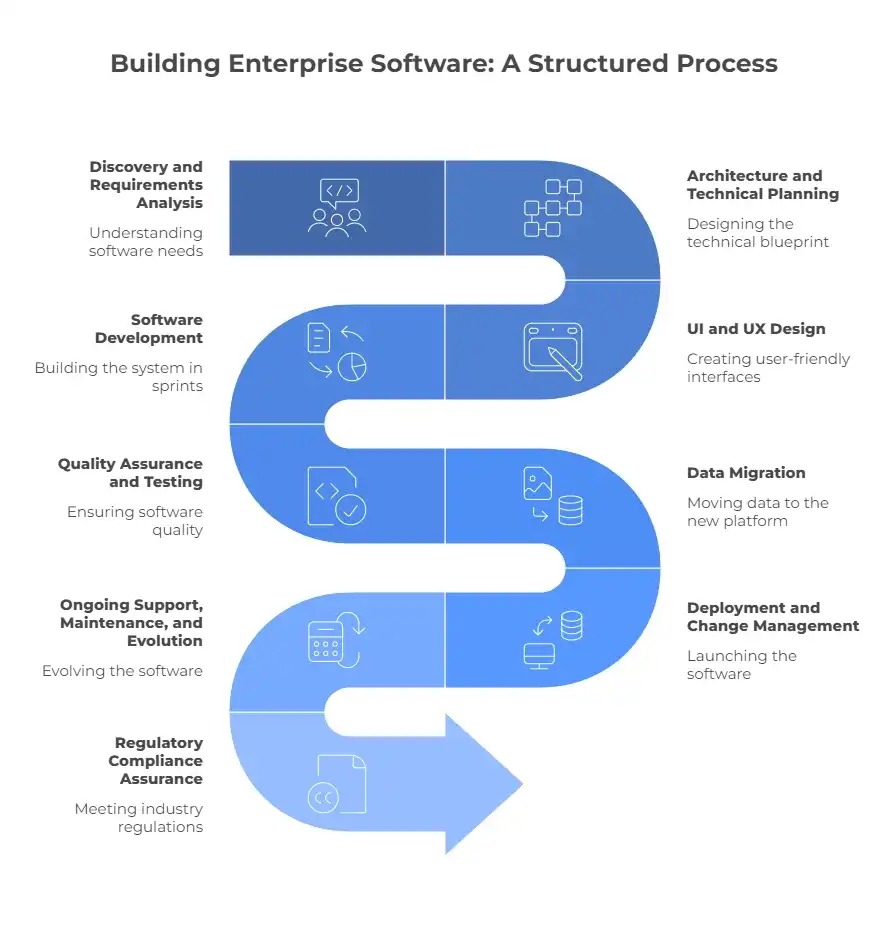
Step 1: Discovery and Requirements Analysis
This is the most important phase and the one most often rushed. Your development partner works with your stakeholders to understand what the software needs to do, what problems it needs to solve, and what constraints it needs to work within.
Good outputs from this phase include documented business and technical requirements, risk assessments covering productivity impact during transition, IT infrastructure audits, and a clear project roadmap with realistic budget parameters.
A thorough discovery phase prevents scope creep and avoids the costly late-stage changes that derail most enterprise software projects.
Step 2: Architecture and Technical Planning
With requirements defined, the architecture team designs the technical blueprint. This covers the technology stack, architectural pattern (microservices vs. monolithic), data flows, integration design, security architecture, and performance requirements.
Modern enterprise systems almost always lean toward cloud-native, microservices-based architectures. Independent services can be deployed, scaled, and updated without touching the rest of the system.
DevOps practices, CI/CD pipeline structure, and the overall QA strategy are all locked in at this stage.
Step 3: UI and UX Design
Enterprise software has a long reputation for being painful to use. That is changing, and it needs to, because poor usability is one of the main reasons enterprise software projects fail to deliver ROI.
Good UX design starts with research into real user workflows, not assumptions. Designers create wireframes, prototype key interactions, and test with actual end-users before a line of code is written.
UI designers then translate approved wireframes into high-fidelity designs aligned with the organization's brand and accessibility standards.
Step 4: Software Development
This is where the system gets built. Development runs in two-week sprint cycles using Agile or scaled Agile frameworks. Backend developers build APIs, database logic, and integrations. Frontend developers build the interface. Integration specialists connect the new system to existing enterprise tools.
In 2025, AI-assisted development tools are part of nearly every professional development workflow. About 84% of developers use AI coding tools, and roughly 41% of code written today is AI-generated or AI-assisted. We cover exactly what this means for your project in Section 5.
Step 5: Quality Assurance and Testing
Enterprise software demands rigorous, multi-layered testing. This includes functional testing (does it work?), performance testing (how does it hold up under load?), security testing (is sensitive data protected?), compliance testing (does it meet regulatory requirements?), and user acceptance testing (can real users actually do their jobs in this system?).
Testing is iterative, not a one-time gate. Findings feed back into development cycles until all acceptance criteria are met.
Step 6: Data Migration
Moving data from legacy systems into the new platform is one of the most technically complex steps in the process. A structured migration plan covers data assessment, field mapping, cleansing to remove duplicates and inaccuracies, staged extraction and loading, and verification to confirm data integrity.
This step is frequently underestimated and is one of the most common causes of enterprise software go-live failures. It deserves dedicated attention and time.
Step 7: Deployment and Change Management
Deployment moves the software into the production environment. Responsible deployment includes staged rollouts (often department by department), production environment testing, user training programs, and a defined rollback plan if something goes wrong.
Change management is just as important as the technical side. Helping your people understand the new system and see the value in it determines whether the software actually gets adopted.
Step 8: Ongoing Support, Maintenance, and Evolution
Enterprise software is never truly finished. After launch, the system needs monitoring, bug fixes, security patching, and feature updates as the business evolves.
Budget 15 to 25% of your initial development cost annually for maintenance and support. The best development partners stay involved after go-live and help the software grow alongside the organization.
Step 9: Regulatory Compliance Assurance
Depending on your industry, your software must comply with regulations like HIPAA (healthcare), GDPR (data privacy), PCI DSS (payments), SOX (finance), or CGMP (manufacturing).
Compliance documentation needs to be gathered throughout the development lifecycle, not assembled as an afterthought at the end. The cost of building compliance from day one is far lower than retrofitting it later.
How AI Is Changing the Way Enterprise Software Gets Built
This is the question we hear most often right now. It deserves a straight answer.
Yes, AI is writing a significant portion of the code in modern enterprise software projects. And no, that does not make the process simpler, cheaper by default, or less reliant on experienced people making good decisions.
Here is what is actually happening in development teams right now.
1. The Numbers
of professional developers use AI coding tools regularly
of all code written in 2025 is AI-generated or AI-assisted
of AI-generated code contains security vulnerabilities without review
2. What AI Actually Speeds Up
Tools like GitHub Copilot, Cursor, and Claude Code can generate functions, write tests, produce boilerplate, and suggest solutions in seconds. Where AI genuinely saves time is in well-defined, repeatable tasks:
- Writing unit tests and test scaffolding
- Generating API boilerplate and data models
- Producing documentation from existing code
- Converting code between frameworks
- Debugging known error patterns
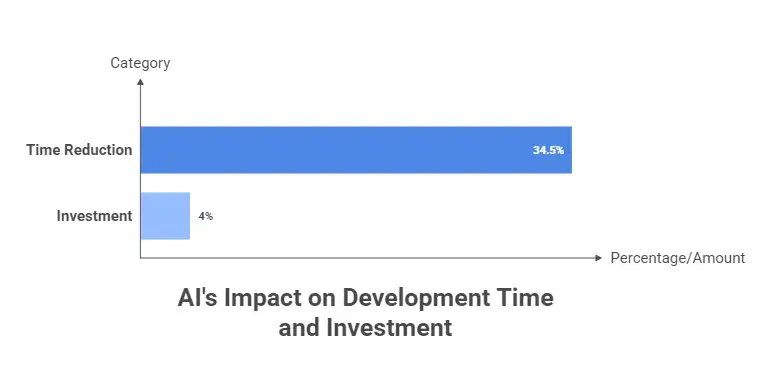
Large enterprises are already seeing 33 to 36% reductions in time spent on routine development activities. Coding AI spend reached $4 billion in 2025, making it the single largest category of enterprise AI investment.
3. What AI Cannot Replace
Architecture decisions require a deep understanding of your organization's data, security needs, integration constraints, and long-term roadmap. AI can suggest patterns, but it does not know your business.
It does not know that your legacy ERP uses a non-standard authentication protocol, or that one of your core integrations has a known performance issue that needs to be designed around.
Security is another area where AI tools regularly fall short. AI can write code that looks correct and passes basic tests while still containing vulnerabilities that only an experienced security engineer would catch.
Business logic is the third area. Enterprise software embeds complex, organization-specific rules about how processes work, how exceptions are handled, and how edge cases should behave.
Getting that right requires close collaboration between developers and the people who actually run those processes. No AI tool substitutes for those conversations.
4. The Honest Productivity Picture
A rigorous randomized controlled trial by METR (2025) studied 16 experienced developers across 246 real tasks.
Developers using AI tools took 19% longer overall once review time was factored in. The same developers estimated they were 20% faster.
Perceived productivity and actual productivity are not always the same thing.
Developers using AI tools took 19% longer overall once review time was factored in. The same developers estimated they were 20% faster.
Perceived productivity and actual productivity are not always the same thing.
The reason for that gap is code review. Only about 30% of AI-suggested code gets accepted without modification. For enterprise software handling sensitive financial, medical, or operational data, shipping unreviewed AI-generated code is not an acceptable risk.
That said, a good development team using AI tools well can reduce time on routine coding tasks by 30 to 40%, which frees senior engineers to spend more time on the architecture, security, and business logic that actually determines whether the software succeeds.
5. What This Means for Cost and Timeline
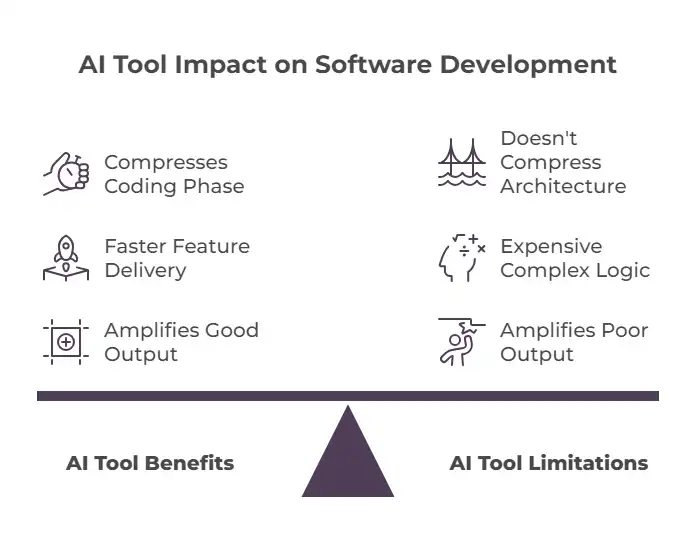
AI tooling can compress certain phases of a project, particularly coding and test generation. Some of that efficiency should flow through to clients in faster delivery of well-defined features.
But the expensive parts of enterprise software development are not the routine code. They are the architecture, security design, compliance work, data migration, and complex logic testing. Those do not compress easily, regardless of what tools developers use.
AI amplifies the output of good teams. In the wrong hands, it amplifies poor output just as fast. When evaluating partners, ask specifically how they use AI tools, what their code review process looks like, and what they do and do not use AI for. Vague answers are a red flag.
What Does Enterprise Software Development Cost in 2025?
Cost is the question every decision-maker asks first. The honest answer is that it depends heavily on scope, but here are useful benchmarks:
| Project Type | Estimated Cost | Timeline | AI Impact on Cost |
|---|---|---|---|
| Small internal tool | $100K to $250K | 4 to 9 months | Some savings on the coding phase |
| Mid-complexity platform | $250K to $500K | 9 to 14 months | Savings on routine dev tasks |
| Large enterprise system | $500K to $750K+ | 14 to 24 months | Limited: complexity dominates |
| AI-native platform | $300K to $1M+ | 12 to 24 months | Mixed: AI adds capability cost |
What Drives the Cost
- Feature complexity and number of integrations: More integrations mean more architecture work, more testing, and more things that can go wrong.
- Team size, seniority, and location: US-based firms typically charge $120 to $400 per hour. Offshore teams run $27 to $82 per hour. Senior engineers cost more because they catch problems earlier.
- Security and compliance requirements: HIPAA, GDPR, SOC 2, and PCI DSS compliance add real cost. Skipping it adds far higher cost later.
- Data migration complexity: Organizations with messy or poorly documented legacy data spend significantly more on migration.
- UX design investment: Better UX costs more to design but saves money on training, support, and rework from poor adoption.
- Ongoing maintenance: Budget 15 to 25% of the initial development cost per year. Software that does not get maintained becomes a liability.
A note on total cost of ownership:
The cheapest vendor who builds a system that needs to be rebuilt in two years costs far more than an experienced partner who builds it correctly the first time. Focus on the total cost of ownership, not just the initial price tag.
The cheapest vendor who builds a system that needs to be rebuilt in two years costs far more than an experienced partner who builds it correctly the first time. Focus on the total cost of ownership, not just the initial price tag.
How Long Does It Take?
Timelines vary significantly by scope and complexity. Here are realistic expectations based on project type:
- Small internal tools: 4 to 9 months
- Mid-complexity platforms (custom CRM, workflow automation): 9 to 14 months
- Large-scale platforms with multiple integrations and compliance requirements: 14 to 24 months
- AI-native or data-heavy enterprise systems: 12 to 24 months
Timelines shorten when requirements are clearly defined upfront, architecture is modular to allow phased delivery, and the development team has solved similar problems before.
They lengthen when requirements are unstable, legacy data is complex, or QA is underinvested. Adding AI tooling to a poorly run project does not make it go faster.
Trends Shaping Enterprise Software Development Right Now
The enterprise software landscape is moving faster than at any point in the past two decades. Here are the trends that matter most for organizations planning or evaluating software investments in 2025.
1. Agentic AI: Moving from Automation to Autonomous Workflows
Gartner predicts that 40% of enterprise applications will be integrated with task-specific AI agents by the end of 2026, up from less than 5% in 2025.
A PwC survey of 300 senior executives found that 79% say AI agents are already being adopted at their organizations. Two-thirds of those report measurable productivity gains.
The highest-ROI use cases so far are not the flashy ones. They are document processing, compliance checks, invoice handling, and data reconciliation. That is where real value is being captured right now.
Important caveat:
Deloitte found that while 38% of organizations are piliting agentic AI, only 11% have it running in production. The gap between pilot and production is real. Closing it requires proper infrastructure, governance, and legacy system integration.
Deloitte found that while 38% of organizations are piliting agentic AI, only 11% have it running in production. The gap between pilot and production is real. Closing it requires proper infrastructure, governance, and legacy system integration.
2. AI-Augmented Development as Standard Practice
As covered in Section 5, AI coding tools are now part of virtually every professional development workflow.
The organizations getting the most from this are not the ones using AI to replace developers. They are the ones using AI to multiply the output of experienced developers, freeing senior engineers to focus on architecture, security, and business logic.
Enterprise software built today should also be designed with AI augmentation in mind: APIs structured for agent integration, modular components that can be extended with AI capabilities later, and data pipelines built to support future ML workloads.
3. Cloud-Native Architecture as the Default
Over 71% of enterprise software deployments are now cloud-based. Cloud-native architecture is no longer a differentiator. It is the baseline expectation.
Applications built for cloud infrastructure, using containers, orchestration, and serverless functions, offer scalability and resilience that on-premise systems cannot match at comparable cost.
4. Composable Architecture Replacing Monoliths
Organizations are moving away from large, tightly-coupled systems toward composable architectures built from independent, interchangeable modules.
This allows teams to update, replace, or scale individual components without touching the rest of the system. In a business environment where requirements change fast, that flexibility has real value.
5. Legacy Modernization as a Strategic Priority
A large portion of enterprise IT budgets is still consumed by maintaining outdated systems that were never designed for current workloads or integration requirements.
Modernizing these systems is one of the highest-return investments many organizations can make. Common approaches include re-platforming to cloud environments, API wrapping to expose legacy functionality through modern interfaces, and phased replacement using strangler-fig patterns.
6. Security-First Development
Zero-trust security architecture is now the design standard for enterprise software. No user or system is trusted by default, and verification happens at every layer.
This matters more than ever because AI-generated code, without proper review, introduces security vulnerabilities at a higher rate than traditionally written code. End-to-end encryption, role-based access controls, multi-factor authentication, and automated security testing integrated into CI/CD pipelines are all expected from day one.
How to Choose the Right Development Partner
The development partner you choose will shape the outcome of your project more than almost any other decision. Here is what separates partners worth working with from those that look good on paper and underdeliver:
- Proven enterprise experience: Have they built systems at the scale and complexity you need? Ask for case studies in your industry. Look at the problems they solved, not just the technologies they listed.
- A discovery-led process: Partners who invest proper time in requirements analysis before writing code build better software. Be cautious of firms that rush to start building before they fully understand what you need.
- Full-cycle ownership: The best partners handle design, development, QA, deployment, and ongoing support. Fragmented responsibility across multiple vendors is a common source of project failure.
- Honest AI practices: Ask specifically how they use AI tools, what their code review process looks like for AI-generated code, and what they do and do not use AI for. Specific and balanced answers are a good sign.
- Transparent communication: You should have real visibility into progress through regular sprint reviews, shared dashboards, and clear escalation paths when issues arise.
- Post-launch commitment: The relationship should not end at go-live. Your software will need to evolve. Choose a partner who plans to be there for that.
Build Enterprise Software with Imaginovation
If you are looking for a technology partner to help you design and build enterprise software that actually solves your operational challenges, we would love to talk.
We have spent over a decade helping businesses in healthcare, manufacturing, logistics, fintech, and beyond build enterprise systems that work the way their organizations actually work.
We do not sell you a predetermined solution. We start by understanding your business. Let's talk.