



Get a personalized assessment of your operational efficiency and accelerate growth for your business.
Across modern enterprises, the cost of disconnected software is no longer a minor operational headache; it is a measurable financial leak.
According to research published in the Harvard Business Review, enterprise employees toggle between different applications and websites roughly 1,200 times every day, losing nearly four hours each week simply reorienting themselves between disjointed interfaces. Compounding this, Asana's Anatomy of Work Index found that knowledge workers spend nearly 60% of their workday on "work about work" (manual coordination, chasing status updates, and copy-pasting data across tools) rather than the skilled work they were hired to perform.
Whether it is a healthcare network managing patient intake across siloed EHR platforms, a third-party logistics (3PL) provider reconciling freight bills against bills of lading, or a financial institution verifying regulatory compliance across commercial loan applications, the underlying bottleneck is identical.
Operational staff are forced to spend their days manually bridging gaps between software systems that were never built to communicate with one another.
Enterprise workflow automation resolves this by orchestrating data, approvals, and system events automatically. Instead of relying on manual data entry, disconnected email threads, or ad-hoc spreadsheets, automated workflow engines listen for business triggers, apply organizational rules, and execute coordinated actions across your technical stack in real time.
When deployed at scale, automated workflows reduce operational cycle times by 70% to 85%, eliminate costly transcription errors, and allow organizations to scale revenue without linearly expanding administrative headcount.
Executive Summary: Enterprise Workflow Automation at a Glance
If your organization runs on dozens of SaaS platforms and custom databases, process modernization requires moving past ad-hoc departmental automations toward centralized orchestration.
| Operational Dimension | Manual Workflows | Departmental Scripting (Point-to-Point) | Modern Enterprise Workflow Automation |
|---|---|---|---|
| Execution Speed | Hours to days (reliant on human queues) | Minutes (brittle, point-to-point APIs) | Sub-second to real-time event triggers |
| Error Rate & Data Loss | High (human typos, missed handoffs) | Moderate (unhandled edge cases crash scripts) | Near-zero (schema validation, automated retries) |
| Auditability & Compliance | Fragmented email threads, manual logs | Incomplete server log files | Immutable, timestamped state histories (SOC 2, HIPAA) |
| System Resilience | Fails silently when staff are absent | Breaks whenever third-party APIs update | Fault-tolerant state machines with dead-letter queues |
| Scalability | Demands linear headcount growth | Increases engineering maintenance debt | Handles millions of concurrent events automatically |
What Is Enterprise Workflow Automation in Modern Architecture?
Simple task automation connects two tools with basic linear triggers, such as saving an email attachment into a cloud folder. Enterprise workflow automation solves a fundamentally different problem. It coordinates long-running, multi-step business transactions across enterprise resource planning (ERP) platforms, customer relationship management (CRM) systems, proprietary databases, and third-party partner portals.
In an enterprise environment, a single workflow often spans days or weeks, requires conditional logic based on dollar thresholds, and must pause safely while waiting for human executive sign-off or external regulatory clearance.
The Four Architectural Layers of Modern Workflow Systems
High-performing enterprise workflow platforms rely on four distinct architectural layers to ensure stability and data consistency:
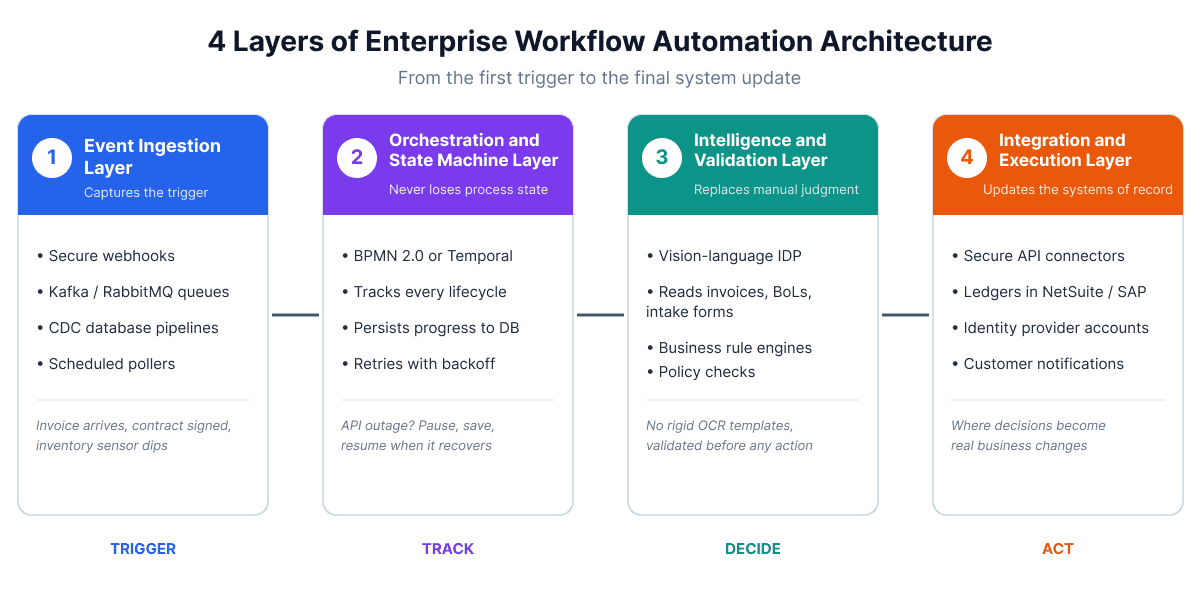
1. The Event Ingestion Layer
Workflows begin with an event. Modern systems capture events through secure webhooks, message queues like Apache Kafka or RabbitMQ, database change-data-capture (CDC) pipelines, or scheduled pollers.
This event-driven foundation ensures the system reacts the instant an invoice arrives, a customer signs a contract, or an inventory sensor dips below a threshold.
2. The Orchestration and State Machine Layer
Enterprise transactions cannot afford to lose state if a server reboots mid-process. The orchestration layer uses deterministic state machines (often built on standards like BPMN 2.0 or code-first workflow engines like Temporal) to track the exact lifecycle of every running process.
If an external API experiences an outage, the state machine pauses, persists the progress to a database, and safely retries the step with exponential backoff once the downstream service recovers.
3. The Intelligence and Validation Layer
Modern workflows integrate artificial intelligence for tasks that historically required human judgment. Rather than relying on rigid OCR templates, Intelligent Document Processing (IDP) uses vision-language models to extract unstructured data from vendor invoices, bill of lading documents, and medical intake forms with high accuracy.
Business rule engines then validate extracted data against corporate policies before triggering subsequent actions.
4. The Integration and Execution Layer
The final layer executes changes across core systems of record. Using secure API connectors, the workflow updates database records, generates financial ledgers in NetSuite or SAP, provisions user accounts in identity providers, and dispatches customer notifications.
Key Business Benefits of Enterprise Workflow Automation
Investing in custom workflow automation delivers measurable returns across operational efficiency, risk management, and capital allocation.
1. Accelerated Process Cycle Times
Manual business processes are hindered by queue latency: the idle time between when one employee finishes a task and when the next employee notices it in their inbox.
Automated workflows eliminate queue latency entirely. When an expense report, vendor contract, or loan application is submitted, routing logic validates the payload and pushes it to the correct approver within seconds. Enterprise teams routinely see cross-departmental approval cycles shrink from seven business days to under two hours.
2. Elimination of Human Data Entry Errors and Reconciliation Debt
Every time an employee retypes an address, part number, or invoice amount from an email into an ERP, they introduce operational risk.
A single transposed digit can delay a freight shipment or trigger an incorrect customer refund. Automated workflows validate data against database schemas at the point of ingestion, ensuring that only clean, normalized data enters core operational tools.
3. Built-In Governance, Compliance, and Immutable Audit Trails
For companies operating under SOC 2, ISO 27001, HIPAA, or SOX regulations, proving compliance is just as critical as maintaining efficiency. Automated workflow systems record every state change, user interaction, timestamp, and API response into immutable audit logs.
When external auditors request proof of segregation of duties or change approvals, teams export complete cryptographic records in minutes rather than spending weeks combing through archived email threads.
4. Unification of Siloed Enterprise Systems
Most enterprises operate an average of over 120 disparate SaaS applications. Without centralized orchestration, data remains trapped in departmental silos: sales data stays in Salesforce, billing data lives in Stripe, and operational tracking sits in custom SQL databases.
Workflow automation acts as a reliable connective fabric, synchronizing data across tools in real time without forcing teams to abandon specialized software.
5. Operational Scalability Without Linear Headcount Growth
In traditional operations, handling a 50% increase in order volume requires hiring 50% more administrative and operations staff. Automated workflows break this dependency.
Once an end-to-end process is engineered, the marginal computing cost of running 10,000 automated transactions is virtually identical to running 1,000, allowing businesses to scale revenue while keeping overhead stable.
5 High-Impact Enterprise Workflow Automation Use Cases
Enterprise workflow automation provides immediate ROI when applied to processes involving high transaction volumes, multi-system data handoffs, and strict approval hierarchies.
1. Finance and Accounting: Automated Quote-to-Cash and Invoice Reconciliation
The Quote-to-Cash (Q2C) lifecycle is often fraught with friction between sales teams and accounting departments.
- The Trigger: A sales representative closes an enterprise opportunity in Salesforce, and the client executes an agreement via DocuSign.
- The Automated Flow: The workflow engine intercepts the signed contract webhook, verifies the billing entity, automatically creates the client profile in the ERP, generates an initial invoice, schedules payment collection, and provisions software access tokens.
- Accounts Payable Pairing: When vendor invoices arrive via email, an intelligent document pipeline extracts the line items, matches them against existing purchase orders in a three-way reconciliation check, and schedules payment if the values match within a 1% tolerance threshold. Discrepancies are routed directly to the purchasing manager for review.
2. Human Resources: Zero-Touch Employee Onboarding and Identity Provisioning
Manual onboarding causes new hires to wait days for software access, hardware provisioning, and benefits enrollment.
- The Trigger: A candidate signs an offer letter in the applicant tracking system.
- The Automated Flow: The workflow engine generates the employee record in the HRIS (such as Workday), creates corporate credentials in the identity provider (such as Okta), adds the user to relevant Slack groups, assigns role-based security permissions, and issues an automated hardware requisition ticket to IT with tracking updates sent directly to the hiring manager.
3. Supply Chain and Procurement: Automated Purchase Orders and Exception Handling
Modern logistics operations rely heavily on custom CRM and ERP automation to handle dynamic inventory shifts and supplier communications.
- The Trigger: Warehouse inventory levels for a critical manufacturing component drop below safety thresholds in the warehouse management system.
- The Automated Flow: The automation platform aggregates inventory burn rates, generates a standardized purchase order, requests digital approval from the procurement director if the total exceeds $50,000, and transmits the order via electronic data interchange (EDI) to the primary supplier. If the vendor responds with an unexpected delivery delay, the system alerts the operations team and suggests secondary suppliers with active master service agreements.
4. Information Technology: Incident Remediation and Access Governance
IT teams often spend hours on repetitive support tickets that follow standardized troubleshooting procedures.
- The Trigger: A cloud monitoring alert flags elevated memory utilization or a failed database container.
- The Automated Flow: The workflow engine opens a high-priority incident ticket in ServiceNow, runs automated diagnostic scripts, attaches telemetry outputs to the ticket, attempts a container restart within an isolated sandbox, and pages the on-call engineer only if automated remediation steps fail to restore target performance within three minutes.
5. Sales and Customer Operations: Lead Routing and Contract Renewals
High-value inbound sales leads require immediate engagement to maximize conversion rates.
- The Trigger: A prospective enterprise customer completes a discovery form requesting technical consultation.
- The Automated Flow: The workflow enriches the domain data with company revenue and employee counts, scores the opportunity, checks for existing account relationships, assigns the lead to the designated regional director, and schedules a calendar invite while generating a briefing document for the sales team.
Real-World Examples of Enterprise Automation at Scale
Examining how large organizations automate mission-critical operations demonstrates the compounding value of reliable workflow architecture.
Capital One: Real-Time Fraud Triage and Exception Handling
In financial services, detecting fraudulent transactions requires sub-second decision-making across massive data streams. Capital One built automated event pipelines that evaluate cardholder transaction requests against complex fraud-detection machine learning models in real time.
When an anomalous transaction occurs, the system does not wait for a human analyst. It halts the pending charge, issues an automated two-factor verification prompt to the customer's mobile device, and updates risk scoring metrics simultaneously. This event-driven approach prevents unauthorized charges while minimizing false positives that frustrate cardholders.
FedEx: Autonomous Customs Document Processing and Logistics Routing
International package distribution requires processing millions of commercial invoices, declarations, and manifests across differing regulatory jurisdictions. FedEx implemented automated document extraction and classification engines that ingest international shipping paperwork, extract declared goods categories, and cross-reference values against customs tariff schedules.
By automating document intake and exception detection before flights land at destination hubs, shipping delays caused by paperwork errors dropped significantly, allowing packages to clear customs before ground couriers begin morning distribution runs.
Target: Omnichannel Inventory Rebalancing and Fulfillment
Retail logistics demands instant coordination between physical storefronts and centralized distribution centers. Target uses automated fulfillment workflows that evaluate online customer orders against live stock levels across thousands of stores and regional warehouses.
When an order is submitted, routing algorithms calculate whether fulfillment from a local store or an outer distribution hub minimizes transit time and packaging costs. The system directs store associates to pick the items, prints shipping documentation, and adjusts local inventory balances in the central ERP in real time, turning retail stores into hyper-efficient micro-fulfillment centers.
A 4-Step Framework for Implementing Enterprise Workflow Automation
Deploying automated workflows across complex organizations requires a structured engineering approach to prevent technical debt and operational disruption.
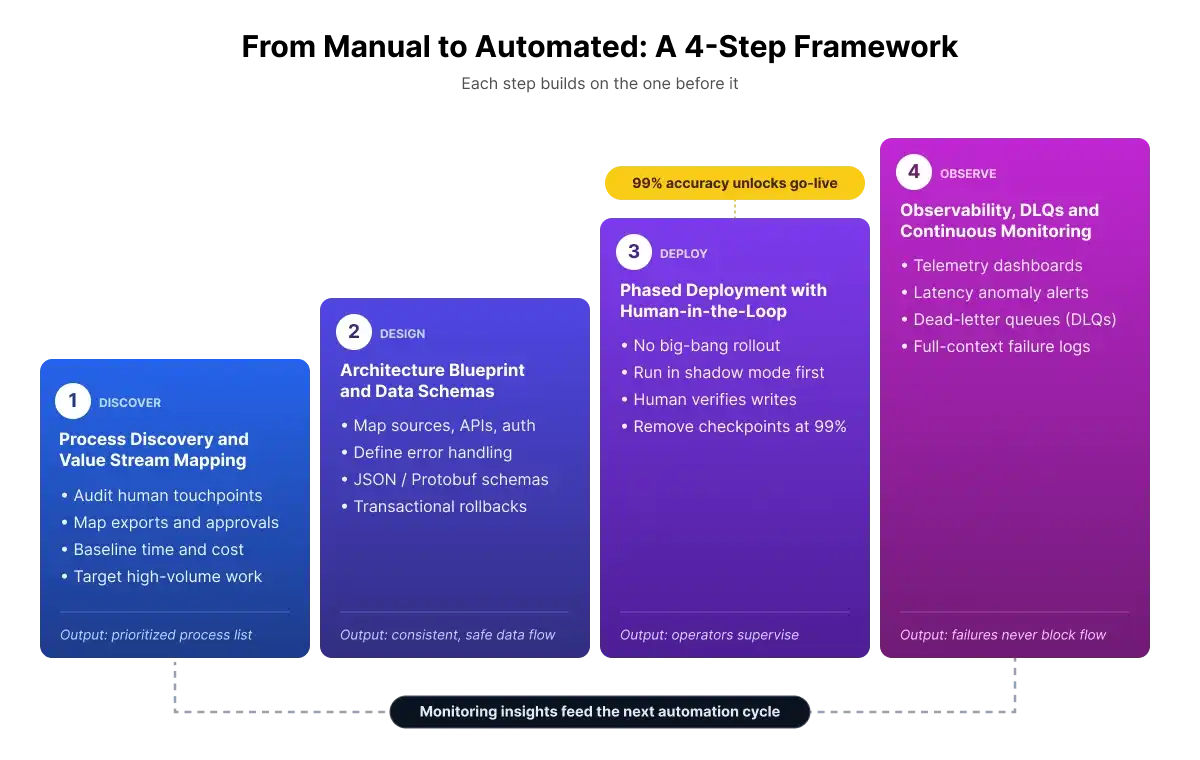
Step 1: Process Discovery and Value Stream Mapping
Before writing code or configuring platforms, teams must audit their existing operational workflows. Document every human touchpoint, spreadsheet export, and manual approval gate. Calculate the baseline cycle time and labor cost for each process. Focus automation investments on workflows with high transaction volume, repetitive rules, and measurable operational friction.
Step 2: Architecture Blueprinting and Data Schema Definition
Map out every data source, API endpoint, authentication protocol, and error-handling condition required for the target process. Establish strict JSON/Protobuf schemas to ensure data consistency across boundaries.
Determine whether the workflow requires transactional rollbacks in the event of an upstream failure, ensuring that partially completed operations do not leave databases in an inconsistent state.
Step 3: Phased Deployment with Human-in-the-Loop Validation
Avoid attempting a big-bang rollout for critical enterprise workflows. Begin by running the automation engine in a shadow mode, where the system executes all data validations and preparations but pauses for human verification before applying final database writes.
Once the automation achieves a 99% accuracy rate across several consecutive production cycles, remove manual validation checkpoints and transition operators to supervisory roles.
Step 4: Observability, Dead-Letter Queues, and Continuous Monitoring
Even the most thoroughly tested workflows encounter unexpected third-party API changes or database timeouts. Production workflow architectures must include comprehensive telemetry dashboards, alerts for anomalous processing latency, and dedicated dead-letter queues (DLQs).
When an execution branch fails, the payload is safely sequestered in the DLQ, alerting engineering teams with full contextual logs without blocking unrelated transactions.
The Imaginovation Approach for Enterprise Workflow Automation
At Imaginovation, we believe that automating an inefficient process simply produces bad outcomes faster. Sustainable digital transformation requires engineering resilient, scalable architectures that align with your long-term operational goals.
Our technical consultants and software engineers work closely with enterprise leadership to identify high-friction bottlenecks and build reliable automation ecosystems. During our initial engagement, we:
- Conduct an Operational and Systems Audit: We review your existing software stack, data models, and departmental handoffs to identify high-ROI automation opportunities and data dependencies.
- Engineer Custom Integration Middleware: When off-the-shelf connectors lack the security, custom business logic, or performance required for your operations, our development teams build bespoke, resilient custom web applications and API middleware.
- Implement Robust State Management and Security: We engineer systems with fault-tolerant state persistence, strict role-based access control (RBAC), and SOC 2-compliant audit logging.
- Provide Continuous Optimization and Support: We deploy observability tools to track transaction latency, exception rates, and throughput, ensuring your automated workflows scale seamlessly alongside your business.
Eliminate manual bottlenecks and bring speed, visibility, and accuracy to your core operations. Contact us to schedule an Enterprise Automation Discovery Session, and let our engineering team build a scalable foundation for your digital product ecosystem.